

Smart Wellness Tech Without WiFi: Setup Guide
Table of Contents
- Understanding Local Network vs. Internet Connectivity for Wellness Devices
- Why Offline Smart Wellness Tech Matters: Privacy and Reliability
- Bluetooth vs WiFi for Wellness Equipment: Choosing Your Control Method
- Setting Up Local Control Smart Home Hubs for Offline Operation
- Privacy-Focused Home Wellness Design: Keeping Your Data Local
- Step-by-Step Setup: Pairing Devices and Configuring Offline Control
- Troubleshooting Connectivity Outages and System Redundancy
- Frequently Asked Questions
Last Updated: September 3, 2026
Understanding Local Network vs. Internet Connectivity for Wellness Devices
Local network connectivity means your devices communicate directly through your home's WiFi or Bluetooth without routing data through the cloud. Internet connectivity sends data to remote servers operated by manufacturers or third-party providers.
For wellness equipment like cold plunges, saunas, and recovery monitoring devices, this distinction matters intensely. A device operating on your local network responds instantly to commands with no lag, no cloud dependency, and no external servers processing your biometric data. This is why smart wellness tech without wifi has become increasingly attractive to people who value both privacy and reliability.
When your internet connection fails, cloud-dependent devices become unusable. Local network devices continue operating perfectly. Your cold plunge temperature controller, sauna heating system, and wearable sensor synchronization all function without interruption. More importantly, your wellness data, heart rate variability, body temperature trends, sleep metrics, never leaves your home.

Why Offline Smart Wellness Tech Matters: Privacy and Reliability
Privacy-focused home wellness design starts with a fundamental question: who owns your recovery data? When your cold plunge, sauna, or wearable sensors transmit information to cloud servers, that data becomes subject to the manufacturer's privacy policy, potential breaches, and regulatory frameworks. Operating devices on your local network keeps that information entirely within your physical home.
The reliability argument is equally compelling. Telehealth monitoring, real-time wellness tracking, and automated recovery equipment all depend on continuous connectivity when cloud-dependent. A temporary internet outage can disable core functionality, your sauna's temperature controls, cold plunge's chiller system, or blanket warmer's thermostat might require cloud authentication to operate.
Consider this scenario: you've scheduled a recovery session after an intense workout. Your internet connection drops. With cloud-dependent equipment, you're waiting for service restoration. With local network operation, you proceed exactly as planned.
Data encryption on local networks provides protection that cloud systems cannot guarantee. Your biometric data, heart rate, body temperature, and recovery metrics stay encrypted within your home network infrastructure. No transmission to external servers means no interception risk during data transfer.
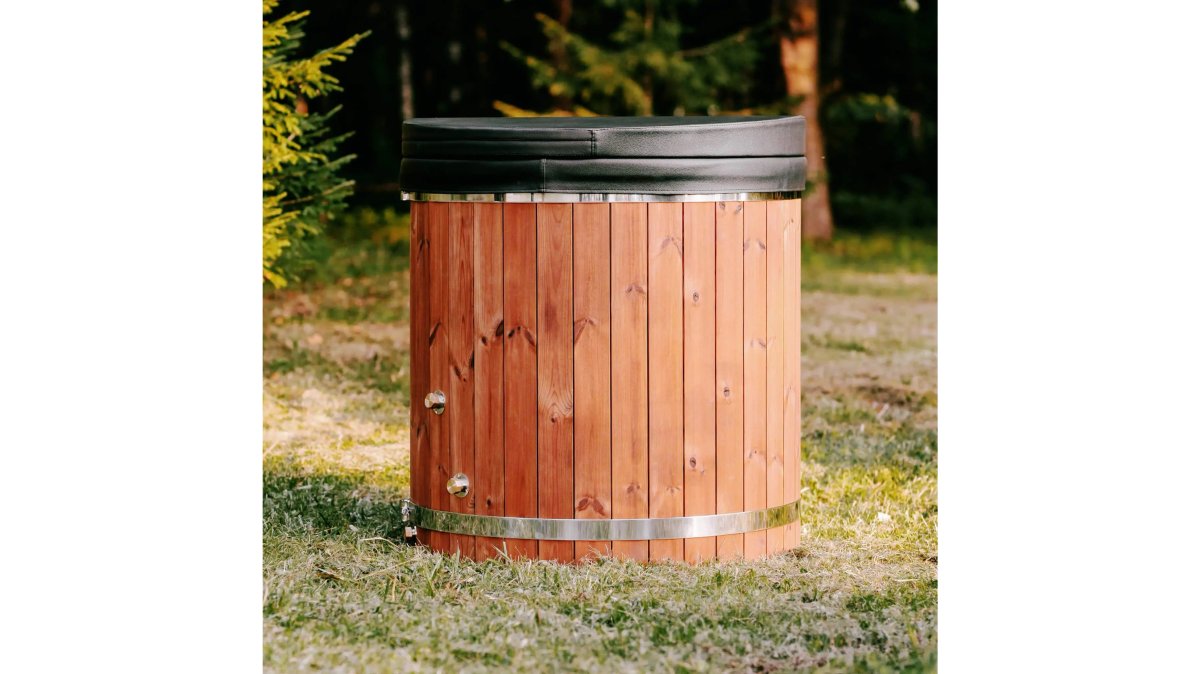
The Prime Recovery Den team has designed premium recovery equipment specifically for homeowners who prioritize autonomy. The Premium 1-Person ThermoWood Cold Plunge Tub operates without requiring any electrical connection or app-based control, you fill it with cold water and use it immediately. This simplicity eliminates connectivity questions entirely, making it ideal for those who want offline operation without complexity. Using this cold plunge will make you feel invigorated and in complete control of your recovery experience, knowing your wellness data remains entirely yours.
Bluetooth vs WiFi for Wellness Equipment: Choosing Your Control Method
Bluetooth operates on the 2.4 GHz frequency with a typical range of 30-100 feet depending on the version. WiFi also uses 2.4 GHz or 5 GHz bands but provides greater bandwidth and longer range, typically 150+ feet in ideal conditions.
For wellness device pairing and initial setup, Bluetooth excels. The handshake process is straightforward: bring your smartphone within range, confirm the pairing request, and the device joins your local network. WiFi-based local control offers better performance for continuous monitoring of multiple devices simultaneously.
The practical choice depends on your equipment ecosystem. A single cold plunge with manual temperature control needs no ongoing connectivity. A comprehensive wellness setup with multiple devices benefits from WiFi's bandwidth and range.
Mesh networking technology bridges this gap effectively. Systems using Bluetooth mesh or WiFi 6 mesh standards create redundant pathways for device communication, ensuring that signal loss in one area doesn't disable your entire wellness network.
Setting Up Local Control Smart Home Hubs for Offline Operation
A local control smart home hub serves as the central coordinator for your offline wellness devices. Unlike cloud-dependent hubs, a true local hub operates entirely within your home network. Popular options include Home Assistant, Hubitat Elevation, and similar open-source platforms.
The hardware requirements are modest. A Raspberry Pi 4 with 4GB RAM or a small form-factor PC can handle dozens of connected devices. The key specification is local processing power, your hub must run automation logic, device synchronization, and data logging without external cloud services.
Configuration begins with isolating your wellness devices on a dedicated network segment. Most modern routers support VLAN (Virtual Local Area Network) creation, allowing you to establish a wellness-only network that never routes traffic to the internet.
Device firmware determines whether true local control is possible. Manufacturers increasingly offer flashable firmware options. Open-source projects like Tasmota or ESPHome provide community-maintained firmware for hundreds of smart devices, explicitly designed for local-only operation.

The configuration process typically involves:
- Flash custom firmware onto your devices
- Configure your hub to discover and authenticate devices on your local network
- Create automation rules for device synchronization
- Establish network segmentation to prevent cloud connectivity
- Test failover scenarios by disconnecting your internet
Most local hubs support MQTT (Message Queuing Telemetry Transport), a lightweight protocol designed specifically for IoT device communication over local networks.
Privacy-Focused Home Wellness Design: Keeping Your Data Local
Building a privacy-first wellness sanctuary means architecting your home network to ensure your biometric data, usage patterns, and recovery metrics never leave your physical property.
Start with device selection. Prioritize equipment that either operates mechanically or offers explicit local control options. The Premium 1-Person ThermoWood Cold Plunge Tub requires no electricity or connectivity, you fill it with cold water and experience immediate recovery. Avoid devices that require cloud authentication for basic operation.
Network architecture determines whether your data stays local. Configure your router to create a separate wireless network exclusively for wellness devices. This isolation prevents accidental cloud connectivity and makes it easier to monitor what data leaves your home.
Data storage should remain local. Store everything on a local NAS (Network Attached Storage) device or your hub's internal storage. This approach gives you complete data ownership and eliminates the risk of third-party analytics companies building profiles from your recovery patterns.
Encryption matters even on local networks. Ensure your hub and devices support TLS (Transport Layer Security) for all communications. Audit your device ecosystem regularly to verify devices remain in local-only mode.
The psychological benefit of privacy-focused wellness design shouldn't be underestimated. Knowing that your recovery data remains entirely within your home creates a sense of sanctuary that cloud-dependent systems cannot replicate. You're reclaiming control over your personal wellness narrative.
Step-by-Step Setup: Pairing Devices and Configuring Offline Control
The pairing process for Bluetooth wellness devices follows a consistent pattern. Ensure your hub has Bluetooth enabled and is in pairing mode. Bring your wellness device within 10 feet of the hub, Bluetooth requires close proximity during initial pairing.
Most devices enter pairing mode by holding a button for 3-5 seconds until an indicator light changes color. Your hub will display the device name. Select the device and confirm the pairing request. The process typically completes within 30 seconds.
For WiFi-based devices operating on a local network:
- Access your hub's configuration interface through a web browser using your local network IP address
- Add the device manually by entering its MAC address or scanning a QR code
- Configure network credentials to connect to your local WiFi
- Set authentication parameters if your local network requires a password
- Verify local connectivity by confirming the device appears on your hub's device list
- Test command execution by sending a simple command
Configuration files for local-only operation typically use YAML or JSON formats. Most configurations are straightforward key-value pairs.
Test your setup by intentionally disconnecting your internet. Verify that all devices continue responding to commands through your hub. This confirms your offline operation is genuinely functional.
Most wellness devices benefit from scheduled automation. Set your sauna to begin preheating 30 minutes before your typical recovery session. Configure your cold plunge's circulation system to run during specific hours. These automations execute entirely on your local hub.
Troubleshooting Connectivity Outages and System Redundancy
Despite careful planning, connectivity issues will eventually occur. Understanding how to diagnose and resolve these issues prevents frustration during your recovery sessions.
Start with basic diagnostics. Verify that your hub is powered on and connected to your local network. Check that your wellness devices are powered and within Bluetooth/WiFi range. Most hubs display a device status dashboard.
For devices that won't reconnect after a power outage:
- Power cycle the device (turn it off, wait 30 seconds, turn it back on)
- Restart your hub if multiple devices fail to reconnect
- Check device logs on your hub to identify error messages
- Verify network credentials haven't changed
- Re-pair the device if simple troubleshooting fails
Connectivity outages often result from interference. The 2.4 GHz frequency is crowded in most homes. Move your hub away from interference sources or switch to 5 GHz WiFi if your devices support it.
System redundancy prevents single points of failure. Consider a two-hub setup where devices can connect to either hub. If one hub fails, your devices automatically switch to the backup.
Battery-powered wellness devices depend on regular charging. Establish a charging schedule and set phone reminders. Battery failure is usually preventable through consistent maintenance.
The most effective troubleshooting approach is preventive: document your working configuration, test failover scenarios monthly, and maintain detailed logs of any connectivity issues.
Building a sophisticated home wellness environment doesn't require surrendering your privacy to cloud-dependent systems. Smart wellness tech without wifi transforms your recovery space into a truly personal sanctuary, where your data stays local, your equipment functions reliably, and your wellness journey remains entirely under your control.
At Prime Recovery Den, we understand that premium recovery equipment deserves a foundation that matches its sophistication. Our Premium 1-Person ThermoWood Cold Plunge Tub is engineered for intentional, offline-first wellness design. It requires no electricity or connectivity, you fill it with cold water and experience immediate, uncompromised recovery. The sensation of plunging into perfectly cold water will make you feel alive, energized, and genuinely in control of your recovery.
Our Summit 24" Passive-Heat Blanket Warmer operates on simple temperature control without cloud dependency, delivering that luxurious sensation of perfectly warmed comfort whenever you need it. Wrapping yourself in this warmer will make you feel completely relaxed and cared for, knowing your wellness experience is entirely yours.
When you integrate these devices into a local network architecture, you're not just gaining convenience, you're reclaiming ownership of your wellness data and creating a recovery environment that feels genuinely yours. That combination of autonomy, privacy, and reliable performance transforms a home into a true sanctuary.
Frequently Asked Questions
Can smart wellness devices function reliably without an internet connection?
Yes. Devices using local control through hubs or direct Bluetooth pairing operate independently of internet connectivity. Cold plunges and saunas with local processing handle commands instantly without cloud latency. However, you lose remote access features when away from home. Battery-powered sensors and hardwired equipment both work offline, though hardwired systems offer better network stability for continuous monitoring.
What are the privacy advantages of offline smart wellness integration?
Offline systems keep your wellness data, temperature readings, usage patterns, recovery metrics, stored locally on your hub or device rather than transmitted to cloud servers. This eliminates exposure to data breaches, third-party analytics, and targeted marketing based on your health habits. Data encryption remains under your control, not dependent on a company's security practices. For health-conscious homeowners, this privacy-first wellness data storage approach offers peace of mind.
Do I need special hardware to run smart wellness tech locally?
You need a local hub or controller compatible with your devices. Popular options include Home Assistant, Hubitat, or manufacturer-specific hubs that support local processing. These devices act as a mesh networking point, communicating with your wellness equipment via Bluetooth or Zigbee without relying on cloud servers. The hub connects to your local network via Ethernet or WiFi, but your wellness devices themselves don't need internet access.
Can I still use mobile apps if my wellness equipment is offline?
Yes, if your local hub supports a mobile app. Apps like Home Assistant or Hubitat allow you to control devices from your phone while connected to your home network. However, you cannot access controls remotely when away from home unless you set up a VPN or similar secure tunnel. For on-site control within your recovery sanctuary, local apps provide full functionality without cloud dependency or latency delays.
This article was written using GrandRanker

Leave a comment
This site is protected by hCaptcha and the hCaptcha Privacy Policy and Terms of Service apply.