

How to Design a Dedicated Gaming Room: A Complete Guide
Table of Contents
- Step 1: Plan Your Space and Layout
- Step 2: Select Ergonomic Gaming Furniture Essentials
- Step 3: Install Luxury Home Theater Seating
- Step 4: Implement Gaming Room Lighting Ideas
- Step 5: Manage Cables and Power Distribution
- Step 6: Add Acoustic Treatment and Soundproofing
- Step 7: Incorporate Gaming Tables and Decor
- Final Touches: Ventilation, Smart Integration, and Accessibility
- Frequently Asked Questions
Last Updated: September 2, 2026
Step 1: Plan Your Space and Layout
Designing a dedicated gaming room starts with understanding your physical space. Sketch out your room's dimensions, door locations, windows, and electrical outlets before buying furniture. This foundational step determines everything that follows, from cable routing to lighting placement.
A dedicated gaming room works best when organized into distinct zones: seating facing your primary display, gaming tables with open floor space for movement, and accessible storage. Consider traffic flow carefully, friends visiting for game nights need to move between areas without squeezing past equipment. Windows create glare on screens, so plan monitor placement to minimize reflections.

Electrical load is critical and often overlooked. Gaming setups draw significant power from multiple monitors, PCs, consoles, lighting, and climate control running simultaneously. Calculate your total wattage needs and verify your room's electrical capacity. You may need a dedicated circuit or professional installation. Don't rely on standard outlet strips for high-demand equipment.
Smart home integration should influence your layout too. Position smart devices where they can communicate effectively with your hub, and test wireless signal strength before finalizing furniture placement.
Step 2: Select Ergonomic Gaming Furniture Essentials
Your body will spend hours in this room, so ergonomic gaming furniture is foundational. Poor seating leads to neck strain, back pain, and fatigue that cuts gaming sessions short. Look for chairs with adjustable lumbar support, armrests matching desk height, and a seat depth that lets you sit back while keeping your feet flat on the floor.
Your keyboard and mouse should sit at elbow height when your arms are relaxed. Monitors should position your eyes to naturally look slightly downward at the screen center. If your desk is too high or too low, poor posture compensation adds up quickly.
Consider a desk with built-in cable management and adjustable height for flexibility between sitting and standing. Storage within arm's reach, small shelves or cubbies for controllers and headsets, keeps your workspace functional and clutter-free.
Step 3: Install Luxury Home Theater Seating
Premium home theater seating transforms your gaming room from functional to immersive. Unlike standard gaming chairs, luxury seating is designed for extended relaxation during long gaming marathons. Look for seating with genuine leather or high-quality synthetic upholstery that resists wear and cleans easily. Motorized recline functions and built-in USB charging ports enhance comfort without cables running across the floor.
Position your seating 8-10 feet from your primary display for optimal viewing distance. This distance lets your eyes take in the full screen without excessive head movement.
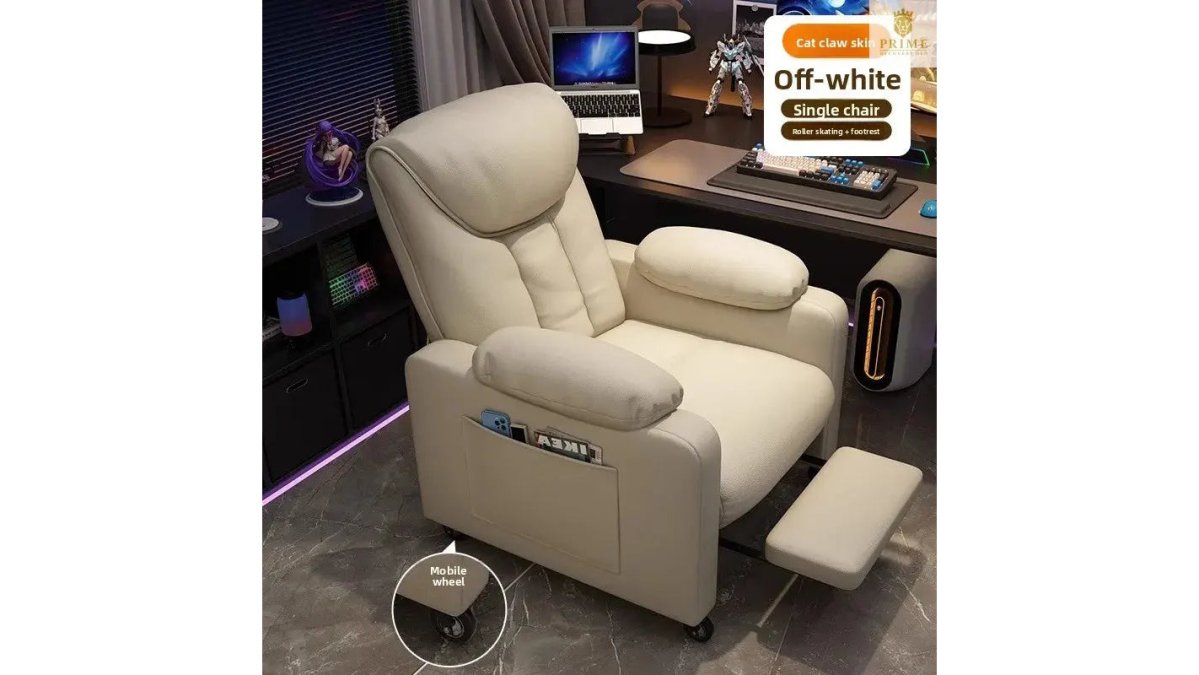
The E-Sports Gaming Sofa Chair from Prime Recovery Den represents this category perfectly. Its leather-finished construction and metal frame deliver durability that withstands years of competitive gaming and casual lounging. The built-in rollers let you reposition easily, while the single-lounge design gives you genuine relaxation without bulk. You'll feel the difference immediately, that sense of sinking into comfort while remaining alert enough to react during intense gameplay. The chair makes you feel both powerful and at ease, creating a sanctuary feeling that transforms a room from "where I game" into "where I belong." When friends visit for game nights, premium seating makes the experience feel intentional and special, signaling that you've invested in creating something worth experiencing.


Step 4: Implement Gaming Room Lighting Ideas
Lighting shapes your gaming room's atmosphere and directly impacts performance. Poor lighting causes eye strain and reduces visibility on screen. Strategic lighting creates an environment where you can play for hours without fatigue while feeling immersed.
Ambient lighting forms your foundation, LED strip lighting along walls, behind monitors, or around the perimeter provides customizable color temperature and intensity. Warm color temperatures (2700K-3000K) feel relaxing and reduce eye strain during evening sessions. Cooler temperatures (4000K-5000K) feel energizing for competitive play.
Task lighting illuminates your desk and gaming surfaces without creating glare on screens. A focused desk lamp or monitor-mounted light ensures you can see controllers and keyboards clearly. Backlighting behind your primary display reduces contrast between your bright screen and the dark wall behind it, lowering eye fatigue.
Match your lighting to your game's mood rather than maximizing brightness alone. Smart lighting integration lets you adjust your entire room's atmosphere from your phone or voice command, making your room feel responsive to your needs.
Step 5: Manage Cables and Power Distribution
Cable management separates a polished gaming room from a tangled mess. Proper cable routing prevents tripping hazards, reduces electromagnetic interference, and makes future upgrades painless.
Start with a quality surge-protected power strip with individual switches for different zones. Cable sleeves bundle multiple cables together, creating clean runs along walls or under desks. Cable trays mounted under your desk keep cables off the floor and out of sight while remaining accessible.
Label everything with a label maker, this saves hours of frustration when troubleshooting. Wireless peripherals reduce cable clutter significantly, though ensure they have reliable range and low latency for competitive gaming. Plan for future expansion by leaving extra cable runs and empty conduit when installing your initial setup.
Step 6: Add Acoustic Treatment and Soundproofing
Sound quality and noise isolation transform your gaming experience. Acoustic foam panels absorb sound waves, reducing echo and improving clarity. Mount panels on walls opposite your primary sound source, typically behind seating or facing displays.
Bass traps in room corners absorb low-frequency rumble that regular panels miss. Sound insulation in walls, through additional drywall layers, mineral wool insulation, or specialized soundproofing membrane, blocks sound transmission more effectively. Soft furnishings like heavy curtains, area rugs, and upholstered furniture naturally dampen acoustics.
Ventilation noise often gets overlooked. Consider quiet, high-efficiency cooling systems designed for minimal sound output that adjust speed based on temperature.
Step 7: Incorporate Gaming Tables and Decor
Gaming tables are the centerpiece of a social gaming room. A foosball table, air hockey table, or ping pong table creates natural gathering points for friends and family.
The Competition Foosball Table from Prime Recovery Den exemplifies this category. Its 56-inch regulation size lets serious players feel like they're competing at a real level. The chrome-plated steel rods, smooth laminated playing surface, and sturdy legs deliver performance and durability that transform casual play into genuine competition. When you're playing on quality equipment, you feel more skilled, more engaged, and more invested in the outcome. Friends notice the difference immediately, elevating the entire experience from "playing a game" to "competing in something that matters."
The 84" Air Hockey Table offers similar quality with rustic wood construction and X-leg base that fits seamlessly into a sophisticated gaming room. The electronic scorer and smooth playing surface keep games competitive and fair.
For a compact option, the 15mm Professional Ping Pong Table delivers tournament-grade play in a foldable design. Its MDF surface provides consistent bounce, and the included net and rackets let you start playing immediately.
Decor should reflect your personal aesthetic while maintaining sophistication. Choose artwork, lighting, and furnishings that align with your style. Display shelving for collectibles or gaming memorabilia adds personality without clutter. Your color palette matters, cool colors feel calm and focused, warm colors feel energizing, and neutral backgrounds let your lighting and displays stand out.
Final Touches: Ventilation, Smart Integration, and Accessibility
Thermal management prevents your gaming room from becoming uncomfortably hot during extended sessions. Multiple monitors, PC towers, consoles, and lighting systems generate significant heat. Strategic ventilation planning includes intake and exhaust pathways that carry heat away from your seating and equipment.
Smart home integration elevates your room from functional to responsive. Connected lighting adjusts based on time of day or game type, and smart climate control maintains optimal temperature without manual adjustment. However, avoid over-complication, a gaming room without smart features is better than one where complex systems frustrate you.
Accessibility ensures your gaming room works for everyone. Clear pathways between seating and gaming tables accommodate mobility considerations. Adjustable monitor mounts let different people position displays at their preferred height, ensuring flexibility for all abilities.
Designing a dedicated gaming room requires attention to multiple systems working together: layout and flow, ergonomic seating, strategic lighting, cable organization, acoustic control, quality gaming tables, and thoughtful finishing touches. The difference between a mediocre room and an exceptional one comes down to intentionality in each area.
Prime Recovery Den's curated collection of premium gaming furniture and seating transforms these functional requirements into an experience that feels sophisticated and restorative. The E-Sports Gaming Sofa Chair, Competition Foosball Table, Air Hockey Table, and Professional Ping Pong Table represent the quality and craftsmanship that elevate a gaming room from utilitarian to sanctuary. When you invest in these pieces, you're creating a space where you feel comfortable, capable, and genuinely present, a place where time spent gaming feels intentional rather than wasted. Your gaming room becomes more than equipment arranged in a space; it becomes a retreat you've designed with care and purpose. The Ergonomic Society's guidelines on workspace design provide additional frameworks for positioning furniture and equipment. The National Association of Home Builders' 2026 remodeling trends report documents the growing investment in dedicated leisure spaces. The Consumer Electronics Association's display technology standards outline optimal viewing distances and refresh rates for gaming displays.
Frequently Asked Questions
What is the ideal layout for a game room?
An ideal gaming room layout divides the space into functional zones: a primary seating area positioned 24-30 inches from your main display, a secondary gaming table zone (like foosball or air hockey), and a peripheral organization station for controllers and accessories. Ensure clear traffic flow between zones and position your seating to minimize glare on screens. The layout depends on your room dimensions and whether you prioritize competitive gaming, casual lounging, or hosting game nights.
How do I balance aesthetics and functionality in a gaming room?
Choose a cohesive color theme and stick to it across furniture, lighting, and decor. Invest in pieces that serve dual purposes, like gaming tables that double as conversation centerpieces. Select luxury home theater seating and gaming furniture with refined finishes that complement your home's style rather than dominate it. Use cable management solutions to hide clutter, and incorporate ambient lighting that enhances atmosphere without sacrificing visibility. Quality pieces from Prime Recovery Den, like our E-Sports Gaming Sofa Chair, combine modern aesthetics with functional design, making you feel both sophisticated and in control of your space.
What are the essential elements for a high-end gaming space?
High-end gaming spaces require ergonomic gaming furniture essentials like a supportive chair with lumbar support, multiple high-refresh-rate displays, professional-grade cable management, acoustic treatment, and layered lighting (task, ambient, and backlighting). Add gaming tables for competitive play, surge-protected power distribution, and smart home integration for climate control. Quality seating like our E-Sports Gaming Sofa Chair ($3,475.98) elevates the entire experience, making you feel immersed and powerful while maintaining the sophisticated atmosphere your home deserves.
How much does it cost to build a gaming room?
Gaming room costs vary widely based on room size and quality level. Budget seating starts around $300-$500, while luxury home theater seating ranges from $2,000-$5,000+. Gaming tables like our Competition Foosball Table ($1,120.34), 84-inch Air Hockey Table ($1,086.95), or Professional Ping Pong Table ($1,335.18) add $1,000-$1,500 each. Lighting, acoustics, and cable management add $500-$2,000. A complete high-end setup typically ranges from $5,000-$15,000+, depending on display quality, furniture choices, and customization.
This article was written using GrandRanker



Leave a comment
This site is protected by hCaptcha and the hCaptcha Privacy Policy and Terms of Service apply.