

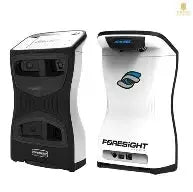
The Foresight launch monitor line has become one of the clearest decision points in premium golf tech: pay more up front for simpler ownership, or lower the entry price and accept ongoing software costs. That tradeoff matters because most buyers are not browsing casually; they want a tool that is accurate, easy to live with, and actually fits their simulator room or practice routine. The GC3, GC3S, and LPi all solve slightly different problems, and the right choice depends less on hype than on how often the unit will be used, where it will live, and how much recurring cost feels acceptable.
Foresight Launch Monitor Review: GC3, GC3S & LPi
This review is built for buyers who want the decision first and the specs second. The Foresight launch monitor family appeals to golfers comparing premium accuracy, simple setup, and real-world usability before spending serious money. That means the important questions are practical: which model gives the best value, which one works best in a home simulator, and which one avoids subscription frustration later on. The GC3, GC3S, and LPi share the same basic approach to measurement, but they serve different budgets and playing environments. If the goal is to make a confident purchase rather than just collect features, the differences between them matter a lot more than the marketing name on the box.
Foresight Launch Monitor Quick Verdict
The short version: buy the GC3 if you want the cleanest premium ownership experience and do not want to think about subscriptions. Buy the GC3S if the lower upfront price matters more and you are comfortable paying for software access over time. Buy the LPi if the setup will stay indoors and you want the most direct path into a home simulator without paying for flexibility you will never use. The strongest reason to choose any of them is accuracy paired with easy setup; the biggest drawback is cost, especially once software and simulator platforms enter the picture. For most serious home users, the GC3 is the best overall value because it balances premium hardware with subscription-free ownership. For budget-focused buyers, the GC3S usually makes entry easier, provided recurring fees fit the long-term plan. If you are comparing launch monitor reviews across premium models, the right answer usually comes down to total cost of ownership and how you plan to use the unit.
What Is the Foresight Launch Monitor Lineup?
These models sit in the same family because they use Foresight’s camera-based measurement approach and focus on delivering dependable ball and club data in a compact unit. That shared foundation is why the lineup feels cohesive: whether the unit is used on a range bay or beside a simulator mat, the core experience is about fast readings and a premium feel rather than a sprawling set of gimmicks. The product split is mostly about where and how the device will be used. Some buyers need indoor-only simulator hardware, others want the freedom to move between a garage bay and the driving range. The biggest purchase decision is whether to pay more up front for ownership or accept a lower starting price with software access tied to a subscription model. That single choice shapes the value of the entire lineup.
Foresight GC3 vs GC3S vs LPi
Seen side by side, the three models are less about raw performance differences and more about ownership structure and environment fit. The GC3 and GC3S are portable units meant for golfers who may use the device indoors and outdoors, while the LPi is aimed at indoor simulator users only. In practical terms, that means the hardware experience is familiar across the group, but software access, flexibility, and price structure change the buying decision. The GC3 usually carries the highest upfront cost because it includes fuller ownership rights. The GC3S lowers the entry price but shifts part of the cost into yearly fees. The LPi typically appeals to buyers who know their setup will stay in one room and want to avoid paying for outdoor portability they do not need. Here is the simplest way to compare them:
| Model | Best for | Upfront cost | Subscription need | Use case |
|---|---|---|---|---|
| GC3 | No-subscription buyers | Highest | No ongoing subscription required for core ownership | Indoor and outdoor |
| GC3S | Lower entry price | Lower | Yes, for full software access | Indoor and outdoor |
| LPi | Home simulator users | Lower than GC3 | Depends on software stack | Indoor only |
The features that matter most are largely shared: accurate measurement, compact design, and a premium camera-based system. The differences that change the buying experience are software access, portability, and whether the unit is being purchased for a dedicated simulator room or a more flexible practice setup. For golfers building a budget around a net, projector, or launch monitor plus computer, those distinctions can be the difference between a smart buy and an expensive mismatch.
GC3: Best for buyers who want no subscription
The GC3 makes the most sense for golfers who would rather pay more at checkout than keep a software bill on the calendar every year. That higher initial price is the tradeoff for long-term ownership simplicity, and for frequent users it often becomes the smarter financial move. If the unit will be used several times a week, the idea of avoiding recurring platform fees has real value. The GC3 also carries the comfort of being the most complete premium option in the lineup, especially for buyers who want indoor and outdoor flexibility plus a built-in display that lets them read numbers without leaning on a phone or tablet. It feels like the version chosen by people who want to buy once and move on.
GC3S: Best for lower upfront cost
The GC3S is designed for buyers who prefer a lower barrier to entry and are fine spreading the cost over time. That pay-later structure can be helpful for golfers building a simulator from scratch, where the launch monitor is only one piece of a larger purchase. Annual fees change the ownership math, though, so this model only feels like a bargain if the subscription aligns with how often it will be used. If the budget is tight now but the golfer still wants a premium Foresight launch monitor, the GC3S creates a more approachable path. If the subscription lapses, access becomes more limited, so buyers should assume recurring payment is part of the plan rather than an optional afterthought. It works best for golfers who value a lower starting number more than long-term simplicity.
LPi: Best for indoor-only setups
The LPi is the clear fit for golfers who know the unit will live inside a simulator room and never need to move outdoors. That narrower use case helps keep the purchase focused and avoids paying for flexibility that may never be used. Indoor-only buyers often care more about room efficiency, reliable ball flight data, and clean simulator integration than range portability, which is why the LPi has a strong place in the lineup. The tradeoff is obvious: less versatility in exchange for a lower price and a more targeted design. For a dedicated home bay, that can be attractive. For anyone who wants to practice at the range, share the unit between spaces, or keep future options open, the LPi’s limits should be understood before buying.
How Much Does a Foresight Launch Monitor Cost?
The honest answer is that a Foresight launch monitor sits firmly in premium pricing territory, and the total spend depends on whether the buyer chooses outright ownership or a subscription-based model. The GC3 is the most expensive at checkout, but that higher sticker price can reduce future payments. The GC3S lowers the initial hit, yet buyers should budget for ongoing software access. The LPi often looks more approachable for indoor users, but the final bill still depends on simulator software, course packages, and the computer or display setup behind it. Secondary costs can matter as much as the monitor itself: gaming-grade PC hardware, compatible simulator software, impact screen, projector, mat, and room treatment all add to the full budget. For golfers comparing options over several years, the cheapest starting price is not always the lowest total cost. Sometimes the model with the bigger first payment is the one that costs less to own.
Upfront price versus long-term ownership
A higher upfront payment can make financial sense when the device will be used often. That is the core ownership logic behind the GC3: spend more once and reduce the chance of repeated fees later. For frequent golfers, the math can tilt in favor of the purchase-heavy model after a few years of steady use. The subscription approach can feel easier at first because the starting number is lower, but it changes the psychology of ownership. Instead of one major decision, the buyer keeps making smaller ones every renewal period. That may suit occasional users or those still testing the simulator lifestyle, but committed players often prefer the certainty of a one-time purchase. The simplest rule is this: the more often the unit will be used, the more valuable it becomes to avoid recurring friction.
Subscription and software costs
What comes included versus what requires payment can materially change the value of the purchase. Buyers should assume the monitor is only part of the system; simulator software, course libraries, and advanced features may sit behind recurring fees or separate add-ons. Those costs affect usability because the launch monitor is most powerful when it feeds into a platform that supports practice modes, virtual golf, and data analysis. If the golfer wants full simulator play, the software ecosystem matters almost as much as the hardware. Extra course purchases can also add up if the goal is to build a broad library of playable venues. It is smart to budget for those recurring and occasional charges before comparing models strictly by sticker price.
Accuracy and Data: What the Foresight Launch Monitor Measures
Accuracy is the reason golfers reach for this category in the first place. At this price level, buyers are not shopping for novelty; they want measurements they can trust during lessons, fittings, simulator play, and practice sessions. Foresight’s camera-based approach is valued because it captures the ball at impact and translates that into useful data without the same space demands as some radar systems. That matters most for golfers who need repeatable readings, not just a flood of numbers. The main expectation should be consistency rather than perfection in every environment. For everyday use, premium accuracy means the launch monitor returns dependable information session after session, so a gapping chart or fitting session reflects real swing changes rather than device noise.
Ball data and club data explained
Ball data describes what happens to the golf ball after impact, including key launch and flight measurements that help explain distance and direction. Club data goes a step further by showing how the club delivered that result, which is valuable for coaching and fitting. Together, those two layers help a golfer diagnose whether the issue is face angle, path, strike quality, or simply the wrong club in the bag. Club readings may require specific markers or setup conditions depending on the system and the shot environment, so buyers should not assume every number appears automatically without some preparation. For newer users, the practical takeaway is simple: ball data shows what happened, club data helps explain why it happened.
Why accuracy matters more than extra metrics
A long list of extra metrics only helps if the readings are dependable. Many premium buyers would rather have fewer numbers they trust than a crowded screen full of figures that drift from session to session. Consistency is especially important for lessons, club fitting, and simulator play because small changes in data can lead to bad decisions about equipment or technique. If the monitor says one thing on Monday and something noticeably different on Wednesday under similar conditions, the value drops fast. That is why accuracy beats metric inflation in this category. The best Foresight launch monitor is the one that gives repeatable numbers you can act on, not just a long dashboard that looks impressive on paper.
Setup and Ease of Use
One of the biggest advantages in this product family is how quickly it gets from box to first shot. Premium launch monitors should not feel like a project, and Foresight generally gets that part right. The setup process is straightforward: place the unit correctly, confirm alignment, connect the software, and start hitting balls. That simplicity matters because a device that is easy to launch is a device that actually gets used. For golfers practicing after work or squeezing in range time on a weekend, friction kills momentum. A launch monitor with a premium price should also reduce setup stress, and that is one of the reasons these models remain popular with serious home users. The learning curve is manageable, but the payoff is high because the system rewards a clean setup without making every session feel technical.
Built-in display and quick alignment
On-device feedback is a real convenience when practice needs to move fast. A built-in display reduces dependence on a phone or tablet, which means fewer interruptions and less fiddling before the first swing. Quick alignment is just as important because a launch monitor only earns trust when it is positioned correctly. The good news is that alignment does not have to be complicated; it becomes a simple habit once the user learns the routine. For busy golfers, this is one of the most practical reasons to choose the Foresight launch monitor line. The unit is designed to encourage use, not slow it down with unnecessary steps.
Portability and build quality
The hardware feels sturdy enough to justify its premium category. That durability matters because the same unit may move between a garage simulator, a basement setup, and the driving range. Portability is not just about carrying weight; it is about how easily the monitor fits into the weekly routine. A compact, well-built device is more likely to be used outdoors, stored safely, and brought back into the simulator room without hassle. The balance between toughness and convenience is a major part of the appeal. Buyers should judge the size and feel against their own routine: if the unit will be moved often, build quality and manageable transport become essential rather than optional.
Indoor Simulator Performance
Indoor performance is where this lineup becomes especially attractive. Many golfers discover that a camera-based launch monitor solves the room-depth problem that can make radar units awkward in a home build. Because the unit is positioned near the ball, it can fit into tighter spaces and still deliver strong simulator functionality. That is a big advantage for single-user garages, basement bays, and shared family setups where every foot of room matters. The overall experience indoors is about convenience as much as data. A launch monitor that reads quickly, aligns simply, and works well with simulator software gives home golfers a realistic practice environment without demanding a massive room. For many buyers, that practicality is the reason to choose Foresight in the first place.
Space requirements and room depth
Space savings are one of the clearest reasons indoor buyers move toward this kind of device. Because placement is closer to the hitting area, the monitor reduces the depth needed behind the golfer compared with some radar-based systems. That can make a major difference in a basement, garage, or spare room where there is simply not enough room for a deeper radar setup. In planning terms, the buyer should think less about “how big can the room be?” and more about “how efficiently can the room be used?” That shift changes the build budget and the entire simulator layout. If room depth is tight, a compact camera unit can be the difference between a workable simulator and a project that never gets finished.
Right-handed and left-handed golfer considerations
Mixed-use spaces can expose a real inconvenience: switching between right-handed and left-handed golfers may require moving the monitor or adjusting the setup. In a single-handed household, that is usually minor. In a shared family room or practice space, it can become annoying if the unit needs to be repositioned every time someone changes sides. Radar alternatives sometimes offer different placement flexibility depending on the environment, so shared users should think carefully about who will actually be swinging. For one primary golfer, the issue is small. For a household where multiple players use opposite handedness, planning the bay layout correctly from the start avoids frustration later.
Outdoor Range Performance
Outdoor use remains a meaningful part of the appeal because a premium launch monitor should not be trapped inside a simulator room. On the range, quick readout and portable convenience matter more than elaborate setup. The ability to bring a compact unit to grass practice, get fast numbers, and move on without major prep makes this a practical training tool. That is especially useful for golfers who split time between a home simulator and regular range work. The outdoor experience is less about building a permanent station and more about making range sessions more productive. If a golfer wants instant feedback on ball flight, club gapping, and impact consistency, the portability of the unit can be worth as much as its data package.
Real-grass versus mat performance
Real turf compatibility matters because it keeps practice closer to course conditions. Mats can be useful, but they do not always reflect the same strike interaction as grass, especially for players working on ball-first contact or wedge play. A launch monitor that performs well on natural turf gives serious golfers a better read on how the swing translates to actual play. That is one reason the Foresight launch monitor line appeals to better players and fitters. The range session becomes more useful when the data is tied to the same lies and conditions faced on the course. For practice-minded golfers, that is a tangible advantage rather than a nice extra.
Software, Courses, and Simulator Compatibility
Hardware is only half the purchase. Once the monitor is in the room, software determines how useful it really is. The ecosystem behind a Foresight launch monitor can support practice, gapping, virtual golf, and course play, but buyers should understand that not every platform is included equally or permanently. This matters because a device that is excellent as a measurement tool can still feel limited if the simulator software does not match the user’s goals. For home golfers, the best setup is the one that balances data, course access, and computer compatibility without creating unnecessary friction. Advanced users may also want third-party software, which can expand the system’s lifespan and keep the purchase relevant as preferences change.
Included software and course access
Bundled software can get a golfer playing quickly, but the quality of the simulator experience is about more than just course count. Some platforms emphasize realism and stable performance, while others focus on a larger library of courses or extra practice tools. Buyers who want instant virtual golf should look closely at what comes in the box and what sits behind another payment wall. A strong course library is helpful, but smooth gameplay and reliable data translation matter more when the simulator is being used regularly. For home users, the most satisfying setup is usually the one that works consistently enough to disappear into the background and let the round feel natural.
Third-party platform support
Compatibility with outside platforms can extend long-term value because it keeps the monitor useful even if software preferences change. Some advanced golfers eventually gravitate toward alternate ecosystems for course realism, coaching tools, or broader community support. That flexibility is worth paying attention to because a premium monitor should not feel locked into one narrow path. The downside is that outside platforms can add recurring costs, so the total package still needs to be weighed carefully. For buyers who like to experiment or expect their simulator needs to evolve, third-party support is an important safeguard rather than a bonus feature.
Is Foresight Better Than TrackMan?
For many buyers, this is really a question about fit rather than absolute superiority. Foresight is not automatically better than TrackMan, and TrackMan is not automatically better than Foresight. The better choice depends on whether the golfer values indoor convenience, space efficiency, and simulator-first usage or wants the broader flexibility of radar-based workflows and outdoor applications. Foresight often feels easier to live with in a home bay because setup is direct and room requirements are friendlier. TrackMan may make more sense in environments where ball flight tracking over distance, outdoor teaching, or broader professional workflows matter more. In other words, “better” depends on where the monitor will spend most of its life.
Where Foresight tends to win
Foresight usually wins on indoor convenience and compact workflow. The setup is simple, the unit is easy to position, and the simulator experience can feel more immediate in tighter spaces. That makes it attractive for home golfers who want to hit balls quickly rather than engineer a large practice bay. The value of a strong simulator-focused workflow is hard to overstate when the room is limited and the goal is regular use. In that environment, Foresight can feel more practical and less demanding.
Where TrackMan may be preferred
TrackMan can be the better fit when radar flexibility matters, especially outdoors or in teaching environments where broader ball-flight tracking is useful. Some players and coaches value that style of measurement because it adapts well to larger spaces and varied practice settings. That does not make it better for every golfer, only for the ones whose routines favor those strengths. The real question is not which brand is universally superior, but which one matches the user’s space, habits, and budget more naturally.
Is Foresight the Best Launch Monitor?
For a golfer prioritizing accuracy, simplicity, and home simulator usability, Foresight is one of the best launch monitor families to consider. That does not mean it is the best for every buyer. Budget, room size, software preference, and outdoor portability all influence the answer. Still, if the goal is a premium, easy-to-live-with unit that works well in a simulator room and delivers trustworthy data, Foresight belongs near the top of the list. Serious home users are the ones most likely to call it the best because the product addresses the exact pain points they care about most: setup friction, room constraints, and confidence in the numbers.
How much does a Foresight launch monitor cost?
Pricing depends on the model and the software stack around it. The GC3 is the premium buy with the highest upfront cost, while the GC3S lowers the entry price but adds recurring software considerations. The LPi is aimed at indoor simulator buyers and can look more approachable, though the final budget still depends on software, computer hardware, and room setup. In other words, the launch monitor price is only part of the total investment.
Which Launch Monitor Does Tiger Woods Use?
Tiger Woods has been publicly associated with premium GC Quad launch monitor equipment, and that association has helped reinforce the brand’s reputation among golfers who want tour-level credibility. For consumers, that matters less as a status signal and more as a clue about how elite players and instructors think about data quality. Tour adoption does not guarantee a better fit for every home user, but it does suggest the brand sits in a serious performance tier. That perception often influences buyers who want a system trusted in high-level training environments rather than a casual gadget.
Who Should Buy the Foresight Launch Monitor?
The ideal buyer is someone who values accuracy enough to pay for it and wants a system that fits a real practice routine. Home simulator golfers are a natural match because the compact setup and strong data make indoor practice efficient. Practice-focused golfers also fit well because quick range sessions become more productive with immediate feedback. Buyers who care most about long-term ownership may prefer the GC3, while those who want a lower entry price may lean toward the GC3S or LPi. The golfers who should probably look elsewhere are the ones who want the cheapest possible path into launch monitor ownership, or those who need maximum outdoor flexibility without premium pricing. Foresight makes the most sense when the buyer is serious enough to think in years, not just in one weekend of experimentation.
Best for home simulator golfers
Indoor golfers get a lot out of the compact setup and repeatable feedback. The unit fits cleanly into a simulator build without demanding a huge amount of room depth, which makes it easier to turn a garage or basement into a usable golf space. Software compatibility and gaming hardware still matter, so simulator-first users should budget for the full system rather than just the monitor. For players building around regular winter practice, virtual rounds, and swing work, this is one of the strongest matches in the category.
Best for practice-focused golfers
Fast setup helps here more than anything else. A golfer who visits the range regularly wants a launch monitor that gives immediate data without turning each session into a technical exercise. That is where premium accuracy becomes worth the money, especially for gapping, wedge work, and club testing. Serious players tend to benefit most because they are more likely to use the numbers consistently over time. Seen that way, the Foresight launch monitor is less of a luxury and more of a training investment.
Pros and Cons of the Foresight Launch Monitor
The strengths are clear: premium accuracy, easy setup, compact indoor performance, and a lineup that gives buyers real choice based on ownership style. The GC3, GC3S, and LPi each solve a different version of the same problem, which makes the family more flexible than a single-model lineup. The main drawbacks are also straightforward: high cost, possible subscription friction, and software expenses that can push total ownership higher than expected. Buyers also need to think carefully about whether indoor-only or indoor-outdoor use matters in the long run. The product is impressive, but it is best for golfers who will actually use the features they are paying for.
Final Verdict: Should You Buy It?
If the budget allows, the GC3 is the easiest recommendation because it combines premium measurement with the cleanest ownership experience. If the main goal is lowering the upfront price, the GC3S is the entry point to consider, as long as the recurring software cost feels manageable. If the setup will stay indoors, the LPi is a smart, focused option for simulator buyers who do not need portability. The biggest reason to buy any Foresight launch monitor is confidence: confidence in the numbers, confidence in the setup, and confidence that the system will fit real use rather than just look good on a spec sheet. For serious golfers, that is usually worth paying for.



Leave a comment
This site is protected by hCaptcha and the hCaptcha Privacy Policy and Terms of Service apply.